April 2023 - EventDraw
Why You Need a Table Numbering System for Events

Why You Need a Table Numbering System for Events

What’s the point of a beautiful venue if your guests are confused, frustrated, or seated in the wrong spot?

Imagine spending $30,000 on a wedding or hosting 500 people at a corporate gala only to watch chaos unfold the moment doors open. Guests wander, staff scramble, the buffet backs up, and that dream event? It starts on the wrong foot.

It’s not the décor or the dress code. Instead, it’s the often-overlooked detail that quietly shapes the entire guest experience, and that is your table numbering.

Like road signs at a busy intersection, table numbers guide the flow of your event, but when they’re missing, misused, or poorly planned, things fall apart. What if your event layout planning actually created stress instead of solving it?

Are you giving guests a smooth, stress-free experience or leaving your team to manage confusion on the fly?

Let’s explore why using table numbering correctly is one of the smartest ways to deliver organised event seating and seamless guest flow.

What is Table Numbering? 

Table numbering is the process of assigning numbers to tables in your event floor plan to guide guests to their seats. It’s one of the simplest ways to bring structure to any gathering, whether it’s a wedding, corporate dinner, awards night, or large-scale conference.

Think of table numbering like giving your event a built-in GPS. Instead of guests wandering, they know exactly where to go. Staff, vendors, and organisers benefit too, because they can refer to a clear map of the room with easy table identification and streamlined guest seating.

A well-executed table numbering system is the backbone of organised banquet seating. It supports everything from efficient event check-in and seating chart optimisation to VIP and special seating areas and accessible seating planning that meets Australian venue standards under the Disability Discrimination Act (DDA).

Whether you’re assigning guests to tables in a detailed RSVP plan or managing large groups with rotating sessions, table numbering plays a vital role in event layout planning, ensuring everyone is in the right place at the right time.

12 Real Benefits of Using Table Numbering at Events

A well-planned table numbering system does more than mark tables. It helps the entire event run like clockwork. 

Whether you’re managing a wedding, awards night, or industry conference, table numbers are your secret weapon for a smooth, professional, and stress-free experience.
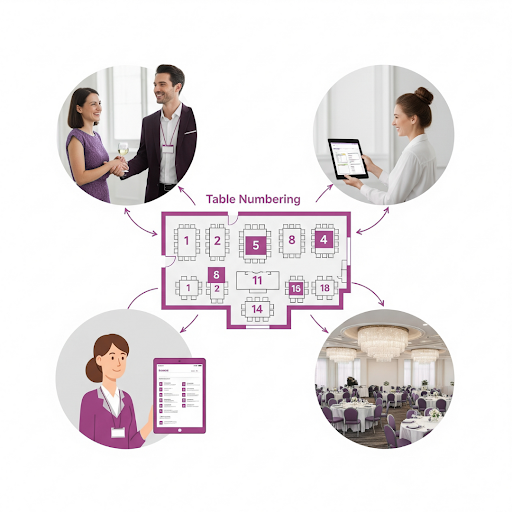
Table Numbering

Here’s how table numbering adds real value to your event planning:

1. Creates a Clear Seating Plan

With table numbers in place, you can pre-assign guests to tables. This approach works perfectly for weddings, charity galas, or business luncheons. 

It supports seating chart optimisation by helping you group attendees based on relationships, roles, or preferences. If a guest cancels at the last minute, you can simply update your plan and reassign seats without any disruption.

2. Improves Guest Navigation

Table numbers act like street signs inside your venue. They make it easy for guests to find their seat quickly, without needing to ask staff or wander around. At a 300-person fundraiser, for example, guests can scan the room and spot their table straight away, keeping traffic flowing and reducing stress.

3. Supports Accessible Seating Planning

Table numbering helps you assign tables for guests with mobility needs. Let’s say three guests are using wheelchairs. You can easily position their tables near ramps, entrances, or exits. This supports safe and accessible table layouts that comply with Australia’s Disability Discrimination Act (DDA) and venue access standards.

4. Enhances Event Décor

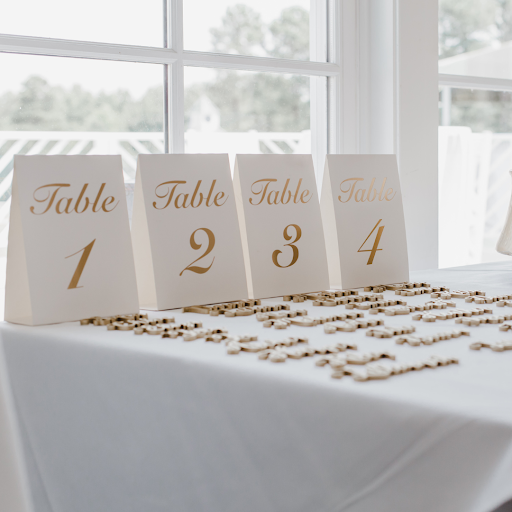
Numbered tables don’t have to be boring. From elegant frames to rustic timber plaques, table numbers can tie into your theme. At a vineyard wedding, table numbers might be etched into miniature wine barrels. For a tech event, you might use digital table displays..

5. Improves Catering and Waitstaff Efficiency

Table numbering directly impacts waitstaff efficiency and food and beverage coordination. When each guest has a meal preference tied to their table number, the catering team can deliver dishes quickly and accurately. In one case, chefs were able to serve 200 guests in under 30 minutes simply because the seating plan matched meal orders to tables.

6. Prevents Meal Order Mix-ups

With table numbers clearly assigned, there’s less risk of food being delivered to the wrong person. Let’s say a guest at Table 8 has a nut allergy and requires a custom meal, the staff can confidently serve them without error, even in a fast-paced setting.

7. Manages Buffet Lines Smoothly

Instead of a chaotic rush to the buffet, table numbers let you control the flow. One common strategy is to call tables in small groups, like Tables 1 to 4, then 5 to 8. This keeps the line short, reduces wait times, and improves the overall dining experience.

8. Simplifies Group Activities and Games

In events with interactive elements, numbered tables make it easy to organise teams. At a business retreat, each table might be assigned a collaborative task. Table 5 pitches an idea, Table 6 presents theirs, and everyone gets involved without confusion.

9. Assists Event Photography and Documentation

Photographers can use table numbers to capture key groups or VIPs with more precision. At a wedding, for example, the couple might request extra shots of friends seated at Table 10, having those tables clearly marked makes those special requests easy to fulfil.

10. Improves Check-in Flow

A guest list with assigned table numbers speeds up event entry. Instead of hunting through hundreds of names, check-in staff can simply ask, “Which table are you at?” and quickly guide guests, keeping the entryway clear and moving.

11. Enables Emergency Seating Changes

Unexpected changes are easier to manage when tables are numbered. If Table 12 ends up with an extra seat because of a no-show, you can easily reassign a new arrival without redrawing the whole plan.

12. Supports VIP and Special Seating Arrangements

Some guests need to be seated front and centre. Table numbering helps you reserve key areas for sponsors, speakers, or bridal party members. For instance, Tables 1 and 2 might be for headline sponsors at a fundraising dinner, placed near the stage for visibility.

What’s the most efficient way to create table numbering for your events?

If you’re still using spreadsheets, hand-drawn sketches, or static PDFs to organise your seating, you’re working harder than you need to. The most efficient way to set up table numbering is by using a purpose-built Event Diagramming Software like EventDraw.

EventDraw takes the stress out of event layout planning. With its intuitive drag-and-drop interface, you can build and adjust your floor plan in minutes, not hours. You can position tables, chairs, and pathways with precision, then assign table numbers with one click.

Whether you’re designing a wedding table numbering layout or managing corporate event table management, EventDraw helps you create a professional and polished plan that’s easy to share with clients, vendors, and your events team.

Here’s why EventDraw stands out as the best solution for creating a table numbering system:

1. Saves Time Instantly

EventDraw is easy to learn and even easier to use. You can create complete table numbering systems and floor plans without needing design experience. This means less time clicking and more time planning.

2. Fully Customisable Layouts

You can customise everything to match your event. Whether it’s round banquet tables for a wedding or long tables for a conference, EventDraw lets you design to suit your theme, space, and guest count.

3. Real-Time Changes Without the Hassle

Last-minute RSVP changes? Table swaps? No problem. EventDraw lets you update your seating plan and table numbering instantly, without redrawing anything from scratch.

4. Supports Seamless Team Collaboration

Multiple team members can work on the same floor plan from different locations. This makes EventDraw perfect for venues and planners who need to collaborate across teams, departments, or vendors.

5. Clear Visual Layouts

With a clean visual overview, you can spot issues before they happen. EventDraw helps you map out accessible seating arrangements, highlight VIP tables, and ensure a smooth guest flow throughout your space.

6. No Limits on Events or Plans

Unlike other tools, EventDraw gives you unlimited users, unlimited plans, and no lock-in contracts. You can create as many table numbering systems as you need across multiple event types, without extra costs or restrictions.

Final Thoughts

Have you ever wondered how  much smoother your events could run if seating wasn’t something your team had to scramble to fix?

Most venue managers and event planners know the stress of last-minute changes, missing VIP details, or guests unsure where to go. But here’s the truth: when your table numbering and layout aren’t planned properly, it affects everything from waitstaff efficiency and meal service timing to guest satisfaction and overall event flow.

That’s why the smartest events today rely on a dedicated Event Floor Plan solution like EventDraw.

What makes it different?
With EventDraw, you can manage complex events that include VIP and special seating areas, emergency seating arrangements, crowd control in large events, and even food and beverage coordination, all from one platform. 

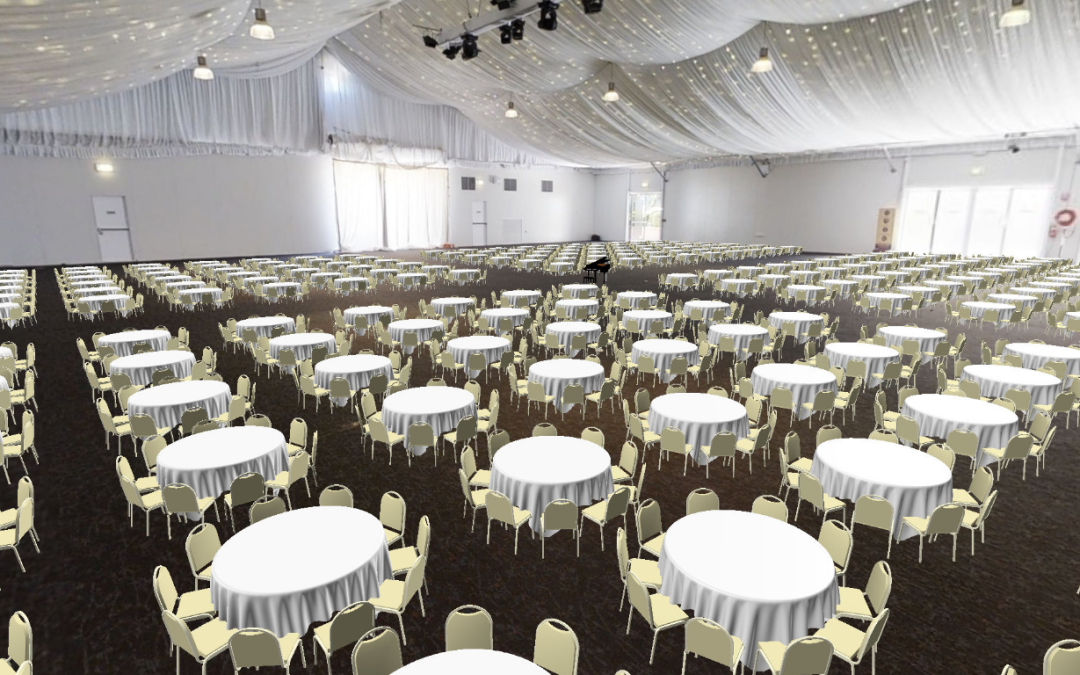
You can design safe and accessible table layouts that follow DDA standards without the guesswork. And with Immersive 3D and 3D transparent views, your clients can actually visualise their event before it happens.

From Casino Resorts and Hotels to Universities, Stadium and Arena layouts, and Performing Arts venues, EventDraw is built to handle every setting.

So here’s the real question:

If your current system can’t instantly update a seating chart, customise layouts, or support real-time collaboration, what’s it really costing you?

With EventDraw, you’re not just drawing a floor plan. You’re creating a reliable, scalable, and visually stunning experience that helps you win more clients, reduce errors, and free up your team to focus on what matters most.

If you could save hours of admin time and present professional-quality layouts without needing a designer, would you?

Because with EventDraw, you can.

Do you want to make table numbering quick and easy?

Watch how EventDraw helps you build clear, professional seating plans in minutes.

Then request a demo to see how our Event Diagramming Software can simplify your next event.

Frequently Asked Questions

1. Can I use EventDraw to number tables across multiple event spaces at once?

Yes, EventDraw allows you to build and manage multiple layouts within the same project. Whether your event spans multiple rooms, breakout areas, or outdoor spaces, you can apply your table numbering system across all zones seamlessly using one intuitive platform.

2. What if I need to split a single table into two during the event?

With EventDraw’s drag-and-drop interface, you can make real-time changes to your Event Floor Plan. If a table needs to be divided or reassigned, you can adjust the layout in seconds without starting over, keeping your table numbering accurate and up to date.

3. Can I highlight special tables like VIPs, media, or sponsors in the numbering system?

Absolutely. EventDraw lets you customise table shapes, colours, and labels. You can visually distinguish VIP or sponsor tables from general seating, helping your team coordinate more easily and giving guests a personalised seating experience.

4. Does EventDraw support multi-language or international numbering systems?

Yes, EventDraw is designed for global use. You can customise your table labels and numbering to suit any language, numbering format, or cultural preference, ideal for international conferences, multicultural weddings, and global exhibitions.

5. How does EventDraw help with last-minute guest changes?

Guest drops out or an extra attendee shows up? No worries. With EventDraw, you can instantly adjust your Event Floor Plan and update the table numbering. This allows your team to reassign seating without manual rework or paper-based confusion.

6. Can I preview my table numbering layout in 3D before event day?

Yes, you can! EventDraw offers both Immersive 3D and transparent 3D views that let you visualise the whole space with accurate table positions, clear seating assignments, and flow paths. This gives you and your clients confidence before the setup even begins.

7. Is EventDraw suitable for venues that host hundreds of events per year?

Definitely, EventDraw supports unlimited users and unlimited plans, with no lock-in contracts. Whether you’re managing 10 or 10,000 events a year, you can create, save, and reuse templates for each table numbering setup, making it a highly scalable Event Seating Arrangement Solution.

How to Build an Event Team that Ensures Planning Success

How to Build an Event Team that Ensures Planning Success

What’s the hidden cost of building an event team that isn’t aligned?

It’s not just one bad event. It’s the kind of misstep that costs you the next booking, dents your reputation, or erodes client trust before the doors even open.

And the worst part? It rarely starts with something big. It might be a missed update, a misunderstood Event Floor Plan, or one team member working from the wrong version. But when those small mistakes stack up, it’s enough to throw off the entire setup and make your venue look unprepared in front of the client.

Most event teams don’t fail because they’re inexperienced. They struggle because their tools, people, and processes aren’t fully connected.

That’s why it matters how you build an event team.

The real risk isn’t technical, it’s operational. A single breakdown in team alignment can lead to wasted labour, delayed setups, and guest confusion. 

Over time, these small issues compound, creating bigger problems that impact your team’s performance and your client’s trust.

Let’s say your venue runs around 15 to 20 events a month, including weddings, conferences, or functions. That adds up to roughly 180 to 240 events each year. 

If your team spends just 45 minutes per event fixing layout errors, chasing down seating changes, or clarifying diagrams, that time adds up quickly. 

Over the course of a year, you could lose more than 150 hours of productivity. This is the equivalent of nearly four full weeks of paid time spent on rework instead of actual delivery.

And this is more common than you might think. According to Corporate Event News (2024), “only 35% of venues and organisers use purpose-built Event Diagramming Software to manage layouts and seating. Most are still relying on spreadsheets, PDFs, or static diagrams, leaving teams unsupported and clients underwhelmed.”

So here’s the real question:

How do you build an event team that’s equipped, aligned, and ready to deliver layout-perfect results, every single time?

In this article, you’ll discover what it really takes to build an event team that scales confidently, collaborates seamlessly, and performs under pressure, no matter how complex the layout.

What makes an event team truly effective?

Running high-performing events starts with the right team. Whether you’re managing weddings, corporate functions, council events, or exhibitions, your results depend on how well your team collaborates. 

Building Your Dream Team: Qualities to Look for in an EventDraw A-Team

It’s the combination of individual skill and collective alignment that leads to consistently smooth and successful outcomes.

This is where smart planning tools like EventDraw help bring structure to your team. When you use Event Diagramming Software to create detailed Event Floor Plans and seating layouts, you give your people a shared visual foundation. It becomes easier to stay aligned, reduce rework, and deliver consistently strong outcomes.

But even the best tools need the right people behind them.

Here are five key traits to look for when building a team that’s ready to scale, collaborate, and make the most of every event planning solution.


1. Availability and commitment

Every successful rollout starts with people who can make time to stay involved. EventDraw is designed to be simple and intuitive, but implementation still requires consistency. 

Look for team members who can participate in onboarding sessions, review layouts regularly, and respond quickly when adjustments are needed, without being pulled away by other demands.


2. Deep knowledge of the venue and operations

Smart tools still need human context. People who understand how your space actually functions, from bump-in logistics to lighting, guest flow, and timing, can ensure that every Event Floor Plan is both practical and realistic. Their insight helps translate visual plans into real-world execution.


3. Strong communication across departments

When multiple departments are working from the same plan, clear communication is critical. Your team should include someone who can liaise across functions, ensuring stylists, caterers, AV teams, and coordinators are working from the same version of the diagram. 

With tools like EventDraw centralising your plans, this role becomes even more powerful in reducing confusion and last-minute fixes.


4. Natural learners who support others

Not everyone on your team needs to be a tech expert. But it helps to have at least one person who enjoys learning, is curious about new features, and becomes your go-to internal resource. 

These team members help others gain confidence in using Event Diagramming Software and play a big role in embedding the tool into your everyday workflows.


5. Confidence with data and digital workflows

If you’re transitioning from spreadsheets or another system, someone needs to ensure that clean data is imported into the new environment. EventDraw makes it easy to create and manage event plans, but the input still matters. A team member who reviews, organises, and double-checks layout details will help maintain accuracy and avoid costly errors down the track.

How EventDraw helps your event team stay aligned and ready

Building the right team is the first step. Supporting that team with the right tools is what keeps everything on track.

EventDraw is designed to make event planning simpler, faster, and more collaborative, so your people can focus on delivering unforgettable experiences. 

Here’s how its features directly support your event team:

a. Immersive 3D and 2D Event Floor Plans

Empower your team to visualise layouts clearly and accurately. With drag-and-drop tools, they can build seating arrangements, place furniture, and map out spaces within minutes, no technical background required.

b. Real-time updates and shared access

Everyone sees the same plan at the same time. EventDraw allows unlimited users to collaborate on layouts in real time, keeping stylists, AV teams, and coordinators entirely in sync with the latest version.

c. 5,000+ furniture shapes and custom design tools

Your team can recreate your actual venue with precision. Use custom shapes and thousands of furniture items to reflect your unique floor plan, ensuring accuracy from the first setup to the final pack-down.

d. Unlimited plans and events, no lock-in

There’s no cap on what your team can create. Whether you run 20 or 2,000 events a year, EventDraw scales with you, giving your team unlimited flexibility without long-term contracts or extra costs.

e. Built-in guest list and seating management

Simplify seating assignments across weddings, conferences, and functions. Your team can manage large guest lists, update tables instantly, and track preferences in one place.

f. Seamless team collaboration

EventDraw supports cross-department coordination. It acts as the visual source of truth for everyone involved, such as venue managers, wedding coordinators, stylists, AV crews, and more.

g. Easy onboarding and internal champions

Because EventDraw is intuitive, natural learners on your team quickly become internal experts. This reduces training time and helps your A-Team roll out new layouts and events faster.

What success looks like when your team and tools are in sync

Picture a Wedding and Conference Centre that delivers more than 200 events each year, from elegant receptions to large-scale corporate functions.

In the past, their team used separate tools for layouts, seating, and guest lists. Floor plans were managed in static files, which often led to delays and miscommunication between departments. Although the team was experienced, the planning process felt slow and reactive.

That changed once they built a focused A-Team and implemented EventDraw across all departments.

Now, every team member works from a single, shared Event Floor Plan. Layouts are easy to adjust, guest seating is updated in real time, and the venue presents immersive, photorealistic diagrams that help clients visualise the space with confidence.

The team collaborates with less back-and-forth and more clarity. Setup is quicker. Communication is smoother. And clients walk into events feeling supported from day one.

This is the kind of outcome that’s possible when your team works together, and your software supports every step of the process.

Final thoughts: Is your team built for scale or just getting by?

By now, you’ve seen what happens when the right system supports the right people.

But here’s a question to consider:

Are you making it easy for your team to succeed or just asking them to figure it out as they go?

When you build an event team that works well together, the next step is giving them the clarity, structure, and confidence they need to deliver every time. That’s where professional-grade Event Diagramming Software makes all the difference.

With EventDraw, your team gets more than just drag-and-drop layouts. They gain a central planning tool that makes collaboration faster, onboarding simpler, and client approvals easier. 

Every Event Floor Plan becomes a shared visual reference, one that removes the guesswork and helps your team stay focused where it matters most.

So ask yourself:

  • Is your current process helping new team members get up to speed quickly?

  • Can your client-facing staff present diagrams that build trust and close bookings faster?

  • Do you have a system that actually supports scale, or just something that gets you by?

If the answer to any of those is unclear, it might be time to try a better way.

EventDraw is the Event Seating Arrangement Solution that helps your team align, grow, and perform at their best, whether you’re running a single Wedding Centre or managing multiple venues across a large organisation.

Ready to see it in action?

If you’re serious about building a high-performing event team, it’s time to give them the tools to match.

Request a demo to see how EventDraw can simplify your planning, strengthen team collaboration, and create stunning, professional Event Floor Plans in minutes.

Building Your Dream Team: Qualities to Look for in an EventDraw A-Team

Frequently Asked Questions

1. How does EventDraw help onboard new team members faster?

EventDraw is designed to be simple and intuitive, even for first-time users. With visual tools, drag-and-drop functionality, and easy navigation, new team members can start creating Event Floor Plans without long training sessions. 

This reduces downtime and helps your A-Team get aligned from day one.

2. Can EventDraw help us document and standardise our internal event planning processes?

Yes. EventDraw lets you create reusable floor plan templates for recurring events or standard layouts. This gives your team a consistent starting point, saves time, and helps onboard new staff with clearly defined planning workflows.

3. How does EventDraw support event teams that manage multiple venues or departments?

EventDraw allows unlimited users and plans, which makes it easy for large teams to collaborate across departments or multiple sites. 

Whether you’re managing a Convention Centre, University campus, or Casino Resort, your staff can access and update Event Floor Plans specific to each space without needing separate systems.

4. Does EventDraw reduce the reliance on printed diagrams and manual approvals?

Absolutely. With Event Diagramming Software like EventDraw, your layouts are fully digital and can be shared instantly with team members and clients. 

This reduces printing costs, eliminates back-and-forth email approvals, and speeds up decision-making across the board.

5. Can we use EventDraw during live setup or bump-in?

Yes. Many teams use EventDraw as a live visual reference during bump-in and event setup. Your staff can pull up the latest Event Floor Plan on tablets or laptops, which ensures that furniture placement, guest seating, and technical setups are executed accurately and efficiently.

6. How does EventDraw help sales and client-facing teams?

When sales teams use EventDraw, they can present photorealistic 3D layouts that help clients visualise their event. This builds confidence, improves conversion rates, and allows sales staff to answer client questions clearly without needing technical assistance.

7. What happens if we outgrow our current planning process, will EventDraw still scale with us?

Yes. EventDraw was built to support growth. Whether you start with one venue or expand to manage hundreds of events per year across multiple teams, EventDraw can scale with no user limits, no cap on event plans, and no lock-in contracts. 

It’s built for flexibility at every stage of your business.

Business Impact Analysis for Event Planning Software

Business Impact Analysis for Event Planning Software


Companies are growing and adjusting to the shifting environment, and they have a growing demand for tools that can measure success efficiently and effectively. EventDraw, a powerful platform for creating and sharing floor plans, has gained popularity in recent years. More and more businesses are looking to adopt this technology, so it’s crucial to understand the impact it will have on their operations.

In this blog post, we will take a closer look at the Business Impact Analysis Worksheet for EventDraw Adoption and explore the current solutions for floor plans that EventDraw will replace. We will also delve into the goals of adopting EventDraw, the problems it aims to solve, and the KPIs that can be used to measure its success. So, buckle up and get ready for a deep dive into the world of EventDraw and how it can improve your business.


In conclusion, businesses will experience a significant impact by adopting EventDraw, particularly the sales team. The sales team will now have a powerful platform to develop and share floor plans with clients, as well as the operations team.

The Business Impact Analysis Worksheet for EventDraw Adoption enables businesses to identify the specific roles that the software will affect, determine the level of impact, and identify the necessary behavioral changes required for a smooth transition.

By implementing a change management strategy that includes creating a workflow guide, bookmarking EventDraw on tablets, and addressing any problems during the adoption phase, businesses can ensure successful implementation. Ultimately, all team members, including the sales team, will be responsible for using the software correctly and consistently. With the right approach, EventDraw can lead to improved business operations and overall success.

Mastering Change Management: Resources, Tips and Strategies

Mastering Change Management: Resources, Tips and Strategies

Change Management Resources and Tips

Change is inevitable in any organization, and managing it effectively is crucial for long-term success. This is where change management comes in, providing a strategic approach to deal with transitions and minimize negative impacts. 

But how can you implement change management effectively? In this blog, we will explore the ADKAR model, a framework for change management, as well as tips for creating awareness and desire, risk mitigation, and KPIs to measure success. 

We will also discuss user group identification and impact analysis, two critical components of successful change management. 

Let’s dive in and discover the resources and tips you need to master change management in your organization.

Mastering Change Management

What and Why?

Change management is the systematic approach and application of knowledge, tools, and resources to deal with change. It involves defining and adopting corporate strategies, structures, procedures, and technologies to handle changes in external conditions and the business environment. Effective change management goes beyond project management and the technical tasks were undertaken to enact organizational changes and involves leading the “people side” of major change within an organization. 

The primary goal of change management is to successfully implement new processes, products, and business strategies while minimizing negative outcomes.

ADKAR Model

A – Awareness of the need to change

D – Desire to support the change

K – Knowledge of how to change

A – Ability to demonstrate skills ad behaviors

R – Reinforcement to make change stick

Creating Awareness and Desire

  1. Sharing WHY EventDraw was chosen with people who were not part of the decision-making process.
  2. Identifying internal champions from each department who will help build buy-in from their team and take ownership of developing their piece of the system and training others.

Risk Mitigation Tips

  1. Project Lead identified and empowered to make decisions.
  2. Dedicated time to focus on the project weekly.
  3. A plan for onboarding all secondary teams Identify potential hurdles (are there individuals or departments that might be resistant to change, and what strategies can we put in place to support them?)

Example KPIs for EventDraw

Adoption 

  1. Number of actions or operational functions moved into Eventdraw from another system or manual process. 
  2. Consistency of use over the first 6-12 months post-implementation 
  3. Percent of staff that say they rely on Eventdraw to complete their job compared to percent who say that about the previous software.

Login Statistics 

  1. Quantity of Users logging in 4+ times per week 

User Engagement 

  1. Percent of users creating content or inputting data 
  2. Percent of users actively downloading or filtering information
  3. Number of enhancement requests generated for EventDraw 

Organization Reach 

  1. Percent of departments utilizing EventDraw as part of their workflow
Mastering Change Management

User Group Identification

Identifying your different user groups and how they will interact with EventDraw will help determine the impact they will experience.

Impact Analysis

An Impact Analysis can help begin the change management process. The provided worksheet should be discussed and completed by upper-level management and the team leading the EventDraw project.

User Group Analysis Example

Mastering Change Management

Are you ready to take your change management skills to the next level? Explore the resources and tips we’ve shared in this blog and start implementing them in your organization today. From the ADKAR model to risk mitigation strategies and KPIs, we’ve got you covered.

Remember, effective change management is key to unlocking long-term success for your organization. Don’t wait, start managing change like a pro now!

Create Accurate and Professional Floor Plans

Create Accurate and Professional Floor Plans


Revolutionize Your Event Planning with Event Diagramming Software! Planning and pulling off successful events can be a big challenge, especially when you have to figure out the perfect floor layout. But now, with Event Diagramming Software, you can make things way easier and ditch the confusion of old-school planning methods.

This software lets you quickly create accurate and professional floor plans for all kinds of events, whether it’s a theater-style setup or a cocktail party vibe – and you can do it all in just a few minutes.

In this blog post, we’re going to walk you through how to use Event Diagramming Software. We’ll cover everything, from making your floor plan and making awesome event venue designs for your clients.

Let’s jump in and see how this software can totally change the game for your event planning!


Implementation Steps and Timeline

The time required for your organization to fully utilize EventDraw can vary depending on several factors. These factors include the departments that will be using the system, potential data conversions, and the size of the team receiving training. Generally, the implementation process can take anywhere between 1 to 8 weeks.

Floor Plan Development

Thanks to our excellent sessions with you, this process is already largely underway. Our team will still have discovery work to be done here so that every aspect of this campaign is delivered perfectly. But, we know that the delivery will be clear & simple.

Setup

EventDraw will be set up to allow the users to drag and drop customized smart shapes (tables, chairs, dance floors, stages, AV equipment etc.) onto a 2D plan. Our delivery team will create these shapes to the exact dimensions of the furniture and AV equipment your Venue currently uses to ensure accurate, ‘to scale’ floor plan layouts. Following the training, staff can create Theatre style, cabaret, dinner dance and cocktail-type plans within minutes.

Revolutionize Your Event Planning Process with EventDraw

Development & Process

  1. Create the logins — this will include our team setting up your user profiles.
  2. Start using the software before launch. Simply drag and drop the tables, chairs, dance floors, and stages onto the scaled floor plan to create an accurate and professional event floor plan. 
  3. Watch the training videos
  4. Designing the user experience for the team using EventDraw — design & build the new event plans during the various stages of the campaign.
  5. Execution and accuracy matters — so this is where we will be spending most of our effort and energy on this project.

Lauch

  • The EventDraw team will handle the development, and we will happily offer advice as needed during and after your account goes live.
  • Going live is the first step – please know we are there to help and support you every step of the way.

Create Function & Event Plans

On average, it takes 90 seconds to create a stunning event plan for your clients. Start making event plans while on the phone with a prospective client, edit live, and lock in the design.

Ready to say goodbye to the hassle and confusion of traditional event planning methods? Sign up for EventDraw today and revolutionize your event planning process! 

With our innovative software, you can easily create accurate and professional floor plans, from theatre-style layouts to cocktail-type plans, all in just minutes. 

Our implementation steps and timeline are customizable to your needs, and our team will support you every step of the way. 

Take advantage of the opportunity to create stunning event plans in just 90 seconds – sign up for EventDraw now!