

Why You Need a Table Numbering System for Events
What’s the point of a beautiful venue if your guests are confused, frustrated, or seated in the wrong spot?
Imagine spending $30,000 on a wedding or hosting 500 people at a corporate gala only to watch chaos unfold the moment doors open. Guests wander, staff scramble, the buffet backs up, and that dream event? It starts on the wrong foot.
It’s not the décor or the dress code. Instead, it’s the often-overlooked detail that quietly shapes the entire guest experience, and that is your table numbering.
Like road signs at a busy intersection, table numbers guide the flow of your event, but when they’re missing, misused, or poorly planned, things fall apart. What if your event layout planning actually created stress instead of solving it?
Are you giving guests a smooth, stress-free experience or leaving your team to manage confusion on the fly?
Let’s explore why using table numbering correctly is one of the smartest ways to deliver organised event seating and seamless guest flow.
What is Table Numbering?
Table numbering is the process of assigning numbers to tables in your event floor plan to guide guests to their seats. It’s one of the simplest ways to bring structure to any gathering, whether it’s a wedding, corporate dinner, awards night, or large-scale conference.

Think of table numbering like giving your event a built-in GPS. Instead of guests wandering, they know exactly where to go. Staff, vendors, and organisers benefit too, because they can refer to a clear map of the room with easy table identification and streamlined guest seating.
A well-executed table numbering system is the backbone of organised banquet seating. It supports everything from efficient event check-in and seating chart optimisation to VIP and special seating areas and accessible seating planning that meets Australian venue standards under the Disability Discrimination Act (DDA).
Whether you’re assigning guests to tables in a detailed RSVP plan or managing large groups with rotating sessions, table numbering plays a vital role in event layout planning, ensuring everyone is in the right place at the right time.
12 Real Benefits of Using Table Numbering at Events
A well-planned table numbering system does more than mark tables. It helps the entire event run like clockwork.
Whether you’re managing a wedding, awards night, or industry conference, table numbers are your secret weapon for a smooth, professional, and stress-free experience.
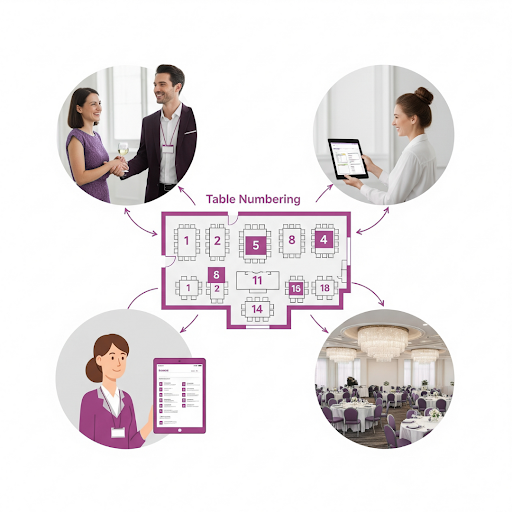
Here’s how table numbering adds real value to your event planning:
1. Creates a Clear Seating Plan
With table numbers in place, you can pre-assign guests to tables. This approach works perfectly for weddings, charity galas, or business luncheons.
It supports seating chart optimisation by helping you group attendees based on relationships, roles, or preferences. If a guest cancels at the last minute, you can simply update your plan and reassign seats without any disruption.
2. Improves Guest Navigation
Table numbers act like street signs inside your venue. They make it easy for guests to find their seat quickly, without needing to ask staff or wander around. At a 300-person fundraiser, for example, guests can scan the room and spot their table straight away, keeping traffic flowing and reducing stress.
3. Supports Accessible Seating Planning
Table numbering helps you assign tables for guests with mobility needs. Let’s say three guests are using wheelchairs. You can easily position their tables near ramps, entrances, or exits. This supports safe and accessible table layouts that comply with Australia’s Disability Discrimination Act (DDA) and venue access standards.
4. Enhances Event Décor
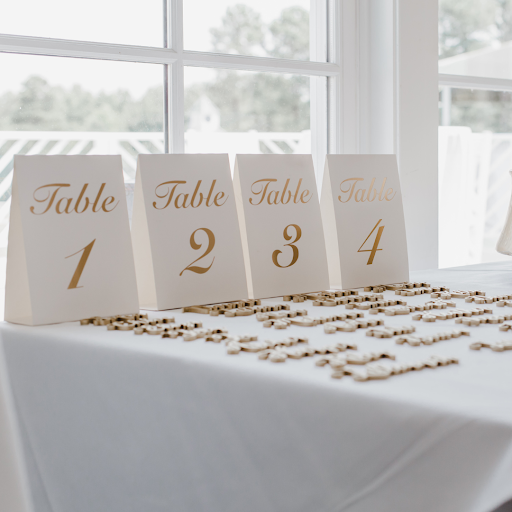
Numbered tables don’t have to be boring. From elegant frames to rustic timber plaques, table numbers can tie into your theme. At a vineyard wedding, table numbers might be etched into miniature wine barrels. For a tech event, you might use digital table displays..
5. Improves Catering and Waitstaff Efficiency
Table numbering directly impacts waitstaff efficiency and food and beverage coordination. When each guest has a meal preference tied to their table number, the catering team can deliver dishes quickly and accurately. In one case, chefs were able to serve 200 guests in under 30 minutes simply because the seating plan matched meal orders to tables.
6. Prevents Meal Order Mix-ups
With table numbers clearly assigned, there’s less risk of food being delivered to the wrong person. Let’s say a guest at Table 8 has a nut allergy and requires a custom meal, the staff can confidently serve them without error, even in a fast-paced setting.
7. Manages Buffet Lines Smoothly
Instead of a chaotic rush to the buffet, table numbers let you control the flow. One common strategy is to call tables in small groups, like Tables 1 to 4, then 5 to 8. This keeps the line short, reduces wait times, and improves the overall dining experience.
8. Simplifies Group Activities and Games
In events with interactive elements, numbered tables make it easy to organise teams. At a business retreat, each table might be assigned a collaborative task. Table 5 pitches an idea, Table 6 presents theirs, and everyone gets involved without confusion.
9. Assists Event Photography and Documentation
Photographers can use table numbers to capture key groups or VIPs with more precision. At a wedding, for example, the couple might request extra shots of friends seated at Table 10, having those tables clearly marked makes those special requests easy to fulfil.
10. Improves Check-in Flow
A guest list with assigned table numbers speeds up event entry. Instead of hunting through hundreds of names, check-in staff can simply ask, “Which table are you at?” and quickly guide guests, keeping the entryway clear and moving.
11. Enables Emergency Seating Changes
Unexpected changes are easier to manage when tables are numbered. If Table 12 ends up with an extra seat because of a no-show, you can easily reassign a new arrival without redrawing the whole plan.
12. Supports VIP and Special Seating Arrangements
Some guests need to be seated front and centre. Table numbering helps you reserve key areas for sponsors, speakers, or bridal party members. For instance, Tables 1 and 2 might be for headline sponsors at a fundraising dinner, placed near the stage for visibility.
What’s the most efficient way to create table numbering for your events?
If you’re still using spreadsheets, hand-drawn sketches, or static PDFs to organise your seating, you’re working harder than you need to. The most efficient way to set up table numbering is by using a purpose-built Event Diagramming Software like EventDraw.
EventDraw takes the stress out of event layout planning. With its intuitive drag-and-drop interface, you can build and adjust your floor plan in minutes, not hours. You can position tables, chairs, and pathways with precision, then assign table numbers with one click.

Whether you’re designing a wedding table numbering layout or managing corporate event table management, EventDraw helps you create a professional and polished plan that’s easy to share with clients, vendors, and your events team.
Here’s why EventDraw stands out as the best solution for creating a table numbering system:
1. Saves Time Instantly
EventDraw is easy to learn and even easier to use. You can create complete table numbering systems and floor plans without needing design experience. This means less time clicking and more time planning.
2. Fully Customisable Layouts
You can customise everything to match your event. Whether it’s round banquet tables for a wedding or long tables for a conference, EventDraw lets you design to suit your theme, space, and guest count.
3. Real-Time Changes Without the Hassle
Last-minute RSVP changes? Table swaps? No problem. EventDraw lets you update your seating plan and table numbering instantly, without redrawing anything from scratch.
4. Supports Seamless Team Collaboration
Multiple team members can work on the same floor plan from different locations. This makes EventDraw perfect for venues and planners who need to collaborate across teams, departments, or vendors.
5. Clear Visual Layouts
With a clean visual overview, you can spot issues before they happen. EventDraw helps you map out accessible seating arrangements, highlight VIP tables, and ensure a smooth guest flow throughout your space.
6. No Limits on Events or Plans
Unlike other tools, EventDraw gives you unlimited users, unlimited plans, and no lock-in contracts. You can create as many table numbering systems as you need across multiple event types, without extra costs or restrictions.
Final Thoughts
Have you ever wondered how much smoother your events could run if seating wasn’t something your team had to scramble to fix?
Most venue managers and event planners know the stress of last-minute changes, missing VIP details, or guests unsure where to go. But here’s the truth: when your table numbering and layout aren’t planned properly, it affects everything from waitstaff efficiency and meal service timing to guest satisfaction and overall event flow.
That’s why the smartest events today rely on a dedicated Event Floor Plan solution like EventDraw.
What makes it different?
With EventDraw, you can manage complex events that include VIP and special seating areas, emergency seating arrangements, crowd control in large events, and even food and beverage coordination, all from one platform.
You can design safe and accessible table layouts that follow DDA standards without the guesswork. And with Immersive 3D and 3D transparent views, your clients can actually visualise their event before it happens.
From Casino Resorts and Hotels to Universities, Stadium and Arena layouts, and Performing Arts venues, EventDraw is built to handle every setting.
So here’s the real question:
If your current system can’t instantly update a seating chart, customise layouts, or support real-time collaboration, what’s it really costing you?
With EventDraw, you’re not just drawing a floor plan. You’re creating a reliable, scalable, and visually stunning experience that helps you win more clients, reduce errors, and free up your team to focus on what matters most.
If you could save hours of admin time and present professional-quality layouts without needing a designer, would you?
Because with EventDraw, you can.
Do you want to make table numbering quick and easy?
Watch how EventDraw helps you build clear, professional seating plans in minutes.
Then request a demo to see how our Event Diagramming Software can simplify your next event.
Frequently Asked Questions
1. Can I use EventDraw to number tables across multiple event spaces at once?
Yes, EventDraw allows you to build and manage multiple layouts within the same project. Whether your event spans multiple rooms, breakout areas, or outdoor spaces, you can apply your table numbering system across all zones seamlessly using one intuitive platform.
2. What if I need to split a single table into two during the event?
With EventDraw’s drag-and-drop interface, you can make real-time changes to your Event Floor Plan. If a table needs to be divided or reassigned, you can adjust the layout in seconds without starting over, keeping your table numbering accurate and up to date.
3. Can I highlight special tables like VIPs, media, or sponsors in the numbering system?
Absolutely. EventDraw lets you customise table shapes, colours, and labels. You can visually distinguish VIP or sponsor tables from general seating, helping your team coordinate more easily and giving guests a personalised seating experience.
4. Does EventDraw support multi-language or international numbering systems?
Yes, EventDraw is designed for global use. You can customise your table labels and numbering to suit any language, numbering format, or cultural preference, ideal for international conferences, multicultural weddings, and global exhibitions.
5. How does EventDraw help with last-minute guest changes?
Guest drops out or an extra attendee shows up? No worries. With EventDraw, you can instantly adjust your Event Floor Plan and update the table numbering. This allows your team to reassign seating without manual rework or paper-based confusion.
6. Can I preview my table numbering layout in 3D before event day?
Yes, you can! EventDraw offers both Immersive 3D and transparent 3D views that let you visualise the whole space with accurate table positions, clear seating assignments, and flow paths. This gives you and your clients confidence before the setup even begins.
7. Is EventDraw suitable for venues that host hundreds of events per year?
Definitely, EventDraw supports unlimited users and unlimited plans, with no lock-in contracts. Whether you’re managing 10 or 10,000 events a year, you can create, save, and reuse templates for each table numbering setup, making it a highly scalable Event Seating Arrangement Solution.