Top 7 Event Planning Challenges and How to Overcome Them
Some events fall apart before the doors even open, and no one notices until it’s too late.
At first glance, everything appears to be in order. The run sheet is ready, the supplier list is confirmed, and the layout has been approved.
However, beneath the surface, pressure quietly builds. All it takes is one missed update or last-minute request, and suddenly everything starts slipping out of sync.
This is usually not the result of a single major issue. Instead, it’s a slow build-up of small, overlooked details, unclear responsibilities, and sudden changes that quietly stack up and cause disruption when it matters most.
These are the event planning challenges that venues continue to face behind the scenes. For example, confusing communication, inaccurate floor plans, unexpected costs, long queues, poor guest flow, and a disjointed team on the day all contribute to rising stress.
So, why do these issues keep showing up, even when everything appears to be under control?
Let’s explore the seven most common challenges that quietly disrupt even the best-planned events. These are especially important for venues that manage multiple teams, have shifting layouts, and high client expectations.

1. Hidden costs that quietly impact your event floor plan
Everything seems locked in. The booking is confirmed, the numbers are final, and the plan is ready to go. However, just before the event, unexpected charges begin to appear. As a result, the budget suddenly feels tighter than expected.
This is one of the most common challenges that venue teams face in event planning. These additional costs can manifest in several ways.
For example, there might be a charge for an additional room setup, last-minute AV requests, or changes to the event floor plan that were not included in the original scope.
Consider this scenario. A client initially confirms theatre-style seating for 150 guests. But a week before the event, the guest list increases. They request a switch to banquet-style seating, which requires more space, additional furniture, and extra setup time.
As the venue, you may need to rearrange the layout, source extra tables, and assign more staff. These adjustments create additional work and extra costs that were never part of the initial quote.
Situations like this often create unnecessary pressure. They slow down approvals, force last-minute decisions, and leave your team rushing to make changes with limited time.
Moreover, even small add-ons can build up quickly. When these costs are not clearly communicated or agreed upon early, they lead to confusion. In the end, the event may feel disorganised, even if the rest of the plan was on track.
This is why it’s helpful to recognise where hidden costs typically come from and understand how they can slip through during the planning process.

2. Slow communication that disrupts your venue operations
Communication delays might seem small at first. However, they can quickly throw off the entire event timeline. Waiting on approvals, chasing down missing details, or trying to confirm changes without clear responses often leaves your team stuck in limbo.
This is one of the most overlooked event planning challenges, particularly for venues that handle multiple bookings and coordinate with various external suppliers.
For example, imagine an event planner updates the guest list but forgets to mention that additional tables are needed. Your team only finds out after the room is already set up.
As a result, you need to rework the event floor plan at the last minute. Or consider a situation where the AV supplier fails to confirm their arrival time. This causes staff to stay longer than scheduled and disrupts your setup flow.
In both cases, a lack of timely communication increases pressure and affects the efficiency with which your team can deliver its work.
When there is no central place to track details and updates, information often gets buried in emails, missed during calls, or scattered across different team members.
Eventually, these delays slow down the setup process, create last-minute stress, and make the venue appear disorganised, even when the original plan was solid.
To avoid these problems, it is essential first to recognise how often communication gaps occur and how they subtly impact day-to-day venue operations. From there, you can explore reliable tools such as venue management software to help keep everything on track.
3. Inflexible layouts that create poor guest flow
When your floor plan looks good on paper but doesn’t work in real life, the result is often long queues, blocked pathways, or cramped spaces. Even when every detail is approved in advance, the layout can still fall short once people begin to arrive.
As per Jennifer Best of Forbes Communications Council, “planning for audience engagement is one of the biggest challenges, no matter the format they hold an event in.” When a floor plan doesn’t support the natural movement of people, engagement drops quickly. Guests hesitate, queues form, and service areas feel more chaotic than welcoming.
This is one of the most frustrating challenges for event planners. The incorrect layout affects more than just the room’s appearance. It impacts service timing, accessibility, and the overall guest experience.
For instance, a wedding reception may seem fine during setup. But as guests move between the bar, buffet, and dance floor, bottlenecks form in areas no one expected. Or during a conference, rows of chairs leave no room for equipment or proper camera angles.
These issues often don’t appear until the event is underway, which makes them harder to fix in the moment.
Guest movement matters. That is why your layout should support comfort, visibility, and smooth traffic flow from start to finish. When the plan doesn’t match how people use the space, the entire event can feel awkward or overcrowded.
Rather than relying on basic diagrams or guesswork, it helps to explore an event seating arrangement solution that allows you to test and visualise how your event floor plan will work in real-time with photorealistic 3D clarity.
Before that, it’s helpful to understand how these layout mistakes occur and how they impact the overall flow within your venue.
4. Last-minute changes that disrupt the whole setup
Just when everything feels under control, a last-minute request comes through. It might be a layout change, a new supplier added to the run sheet, or extra tables needed for late RSVPs. These updates often seem minor at first. However, they can completely throw off your schedule and setup.
This is one of the more stressful event planning challenges, especially for venues managing tight timelines or back-to-back bookings.
Even small changes require coordination across multiple teams, including floor staff, catering, AV, and decorators. If any part of the update is missed or delayed, the entire setup may fall behind schedule.
For example, imagine your team has already finalised the room. Then the client suddenly requests a new stage position or changes the table configuration.
As a result, your staff will need to rearrange the furniture, adjust the lighting, and recheck all access points. What was once a smooth plan quickly turns into a rushed and reactive setup.
These moments not only affect the layout. They also impact staff workflows, vendor coordination, and the pace of the entire day. When there is no fast way to visualise and share updated plans, things often become confusing and difficult to manage.
That is why it helps to recognise how often last-minute requests appear and how much they can slow things down. Once you understand their impact, you can explore solutions such as event diagramming software to help your team stay on track and work more efficiently under pressure.
5. Unclear roles that lead to staff confusion
When everyone assumes someone else is handling a task, it often doesn’t get done at all. This kind of mix-up is common during events, mainly when roles are not clearly defined before the big day.
This challenge often goes unnoticed, but it can cause significant disruption. Without clearly assigned responsibilities, team members may double-handle some tasks while others are entirely overlooked. As a result, service slows down, guests are left waiting, and your team feels overwhelmed.
For example, your staff might expect the event planner to manage the seating setup. However, the planner assumes your venue team is handling it.
If no one clarifies who’s doing what, the room may be incomplete when guests arrive. Similarly, if no one is assigned to greet suppliers, delivery delays and miscommunications can accumulate quickly.
This type of confusion not only impacts the experience on the day but also puts extra pressure on your team to fill gaps that could have been avoided. In many cases, the issue starts with a lack of visibility into the whole event seating arrangement solution or setup plan.
Before solving this, it helps to identify how often tasks overlap or unclear delegation causes slowdowns. Once you can see the gaps, it becomes easier to improve coordination and avoid last-minute panic.

6. Limited time to set up the event floor plan
Tight setup windows are a common pressure point, primarily when your venue hosts back-to-back bookings or shares space with other teams. Even with the best planning, there are times when you have less time than expected to complete the setup.
This challenge often creates a domino effect. If one vendor runs late or a delivery is delayed, your team has to work faster to meet the schedule. In some cases, you may need to cut corners to get everything in place before guests arrive.
For instance, your team might set up the room over several hours. But due to an earlier function running overtime, you are left with just one hour to build the whole layout, test AV, and confirm access routes.
With limited time, your team may skip critical steps, and that increases the risk of something being missed.
This becomes even more challenging when working with a complex event floor plan or multiple suppliers requiring access simultaneously. When everyone is racing the clock, even simple tasks can feel rushed and chaotic.
It is essential to consider how often your setup timeline gets shortened and how that affects the quality of execution. From there, you can begin to find ways to streamline the process and ensure your team can deliver under pressure.
7. Juggling multiple systems that don’t work together
Running events often means dealing with a mix of tools, emails, spreadsheets, floor plan PDFs, and handwritten notes. While each system might serve a purpose on its own, switching between them slows everything down and increases the chance of something slipping through the cracks.
This is one of the most frustrating event planning challenges because it creates unnecessary admin and miscommunication. Information gets duplicated, lost, or updated in one place but not the other. As a result, teams get out of sync, and last-minute fixes become the norm.
For example, your venue might use one system for bookings, another for floor plans, and email chains for communicating with suppliers.
If someone updates the layout but forgets to notify the setup crew, the room may not be prepared correctly. These disjointed processes make it hard to manage the event smoothly from start to finish.
Over time, relying on too many disconnected tools becomes exhausting. It puts pressure on your team to manually track updates and respond to last-minute changes with limited visibility.
This is why it’s essential to recognise how often these inefficiencies appear. Once you understand how much time is spent juggling systems, it becomes easier to explore whether venue management software can help simplify your workflow and keep everyone on the same page.
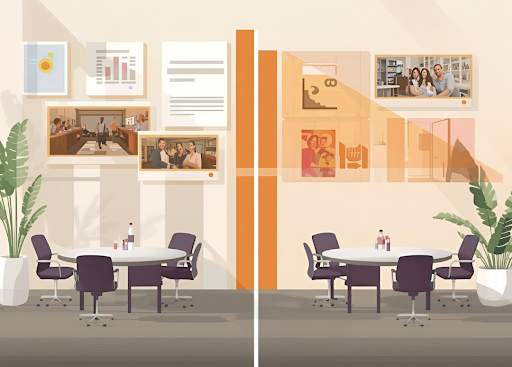
Here’s how they compare:
Face-to-face events:
- Rely heavily on the physical setup and smooth guest flow
- Require accurate layouts for seating, stage placement, and service areas
- Often involve shorter timelines and quicker on-the-ground decisions
- They are usually easier to manage since everyone is present in one location
Hybrid events:
- Combine virtual and physical elements, which increases the complexity of the setup
- Require designated zones for cameras, lighting, streaming equipment, and backup tech
- Demand stronger infrastructure for internet, power, and sound
- Make guest movement and equipment placement more difficult to visualise without the right tools
- Frequently require adjustments to the event floor plan to support both in-person and remote audiences.
As per Harvard Business Review, “the pivot to hybrid events poses three key challenges—complexity, engagement, and personalization—to chief marketing officers and marketing event planners.”
These same issues often flow straight into the venue’s operations. Supporting hybrid formats means adapting floor plans, managing tech zones, and coordinating for two audiences at once, which increases the need for visual clarity and flexible tools.
Although both formats need detailed planning, hybrid events often allow less room for error. For example, a single layout issue can impact not only the guest experience at the venue but also the quality of the livestream or recording.
This is why having flexible and visual planning tools becomes essential. When your team can map out both seating and technical requirements, you gain better control and confidence. This applies whether the event is entirely in-person, fully online, or a combination of both.
How EventDraw simplifies venue planning for every event format
Every challenge you have just read about, including unexpected costs, last-minute changes, unclear communication, and limited setup time, shares one common issue. These problems often begin when there is a lack of clarity and control during the planning process.
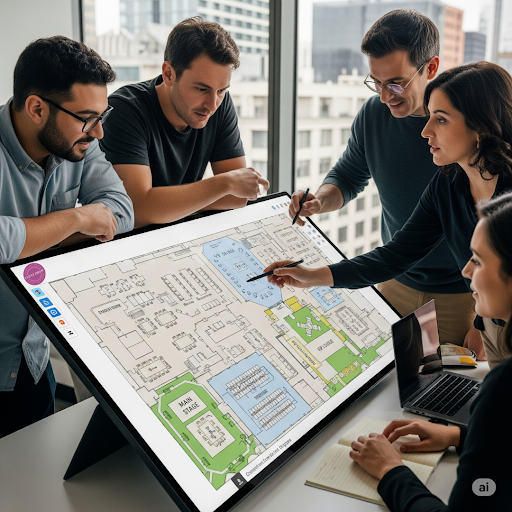
This is precisely where EventDraw steps in as the practical, all-in-one solution for busy venues.
As a comprehensive event diagramming software and event seating arrangement solution, EventDraw enables your team to plan smarter from the outset. You can design precise and detailed event floor plans in minutes using an intuitive drag-and-drop interface. These layouts are easy to update, share, and adjust in real-time, which helps everyone stay aligned without confusion.
In addition to floor planning, EventDraw includes powerful inventory tracking features. This allows your team to assign specific furniture, equipment, and items to each event layout. You can see what is available, what is already in use, and where it should be placed.
This level of visibility makes setup smoother, avoids double-booking, and ensures you never run short of items on the day.
Here is how EventDraw directly supports each challenge your venue faces:
- When hidden costs arise, EventDraw helps you visualise what is included upfront, reducing last-minute surprises.
- When communication slows down, everyone can view the same live plan with all updates in one place.
- When layouts cause issues with flow, you can use immersive 3D and real-time previews to adjust for a better experience.
- When requests change suddenly, plans can be updated on the spot without needing to restart from scratch.
- When roles are unclear, clearly marking zones and tasks can help keep your team informed.
- When setup time is short, pre-planned layouts and tracked inventory help you move faster with confidence.
- When you manage too many disconnected tools, EventDraw becomes your comprehensive venue management software, all in one place.
Final thoughts
Every venue deserves tools that do more than just tick boxes. When you are constantly dealing with hidden costs, unclear layouts, rushed timelines, or staff confusion, it is worth asking a straightforward question.
What could your team accomplish if your planning process supported you?
If your current process still involves guesswork, outdated diagrams, manual seating charts, or scattered tools, you are not just wasting time.
You might also be missing opportunities to improve your guest flow, maximise your space, and present clients with a more professional experience from day one.
EventDraw is more than just an event diagramming software. It is a comprehensive event seating arrangement solution that provides visual accuracy, flexible planning, inventory management, and the ability to collaborate without limits. You can create detailed 2D and immersive 3D floor plans that bring your layout to life and adapt to changes in real-time.
Whether you run a stadium, a wedding and conference centre, a performing arts venue, a government or council facility, a university, or a casino resort, your venue deserves tools that support how you work.
So, what would your team gain by switching to a more innovative event floor plan system?
The proper venue management software should save time, reduce stress, and help you handle any type of event with confidence.

Frequently Asked Questions
1. How can EventDraw help when different teams are working on the same event?
EventDraw enables unlimited users to collaborate on the same plan simultaneously. Everyone can view updates in real time, which helps reduce miscommunication and keeps your entire team aligned from setup to pack-down.
2. Can EventDraw support large and complex venues, such as stadiums or exhibition centres?
Yes. EventDraw is trusted by stadiums, convention and exhibition centres, and high-capacity venues. Its scalable features and custom furniture libraries make it easy to accurately map out large-scale event floor plans, even with thousands of seats or multiple layout zones.
3. What if I need to manage multiple events at once?
You can create and manage an unlimited number of event plans with EventDraw. Whether you are handling weddings, conferences, or back-to-back corporate functions, you will always have access to past, current, and upcoming floor plans all in one place.
4. How does EventDraw help with last-minute bookings?
With drag-and-drop tools, pre-saved templates, and real-time layout adjustments, EventDraw lets you build or modify floor plans in minutes. This means your venue can stay flexible, even when a new booking or layout request comes in on short notice.
5. Can EventDraw help reduce time spent on client approvals?
Yes. EventDraw’s easy-to-read 2D and immersive 3D visualisations help your clients understand the setup without needing technical explanations. This speeds up feedback, improves decision-making, and reduces the need for back-and-forth emails or delays in sign-off.
6. How does EventDraw support guest list management?
EventDraw allows you to create a complete event seating arrangement solution. You can easily place tables, assign names, adjust positions, and manage capacity. This makes it simple to track where every guest is seated and update layouts as RSVPs change.
7. What if I need to customise furniture or layout elements specific to my venue?
EventDraw includes over 5000 furniture shapes and also allows you to design your own. This ensures that your event diagramming software accurately reflects the exact layout of your space, whether you are working in a university hall, a government building, or a performing arts centre.